See the move before you do it
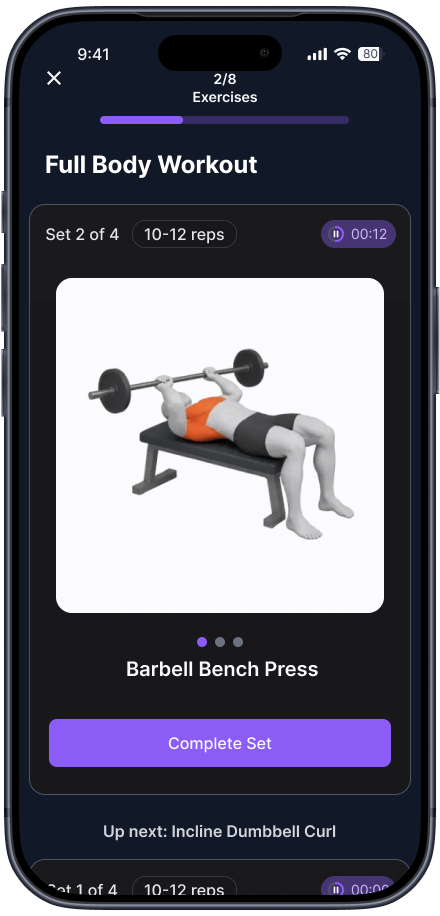
Every exercise in your workout plays as a clean animation, so you know the setup and the range before you pick up the bar.
 Pyndra
Join the beta
iOS public beta · United States
Found an exercise on TikTok or Instagram? Copy the link. Pyndra picks out the movements, you confirm them, and it becomes a workout you can take to the gym.
The saved folder problem
You save a great leg day on Tuesday. By Saturday it’s buried under forty other posts, and you’re standing in the gym scrolling instead of lifting.
Pyndra takes the workouts you already saved and puts them in order: named exercises, sets, reps and rest.
How it works
See a workout worth doing on TikTok or Instagram? Share it to Pyndra or paste the link. That’s the whole import.
Pyndra reads the post’s caption and suggests the movements. Keep them, swap one, or add what it missed from the exercise library.
Your saved exercises become a session with an order, sets, reps and rest. If you’re short on moves, Pyndra fills the gaps from its own library.
Follow a clear animation of every exercise, tick off each set, and let the rest timer keep your pace. Your history is there when you want to repeat it.
Inside the app
Every exercise in your workout plays as a clean animation, so you know the setup and the range before you pick up the bar.
Step-by-step instructions and form tips sit one swipe away from the animation, right when you need them.
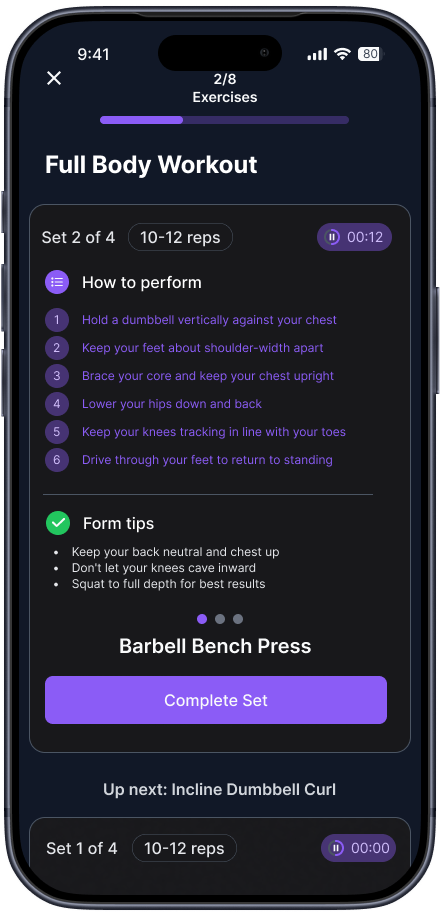
Tap to complete a set. The rest timer starts, your progress bar moves, and the next exercise is already queued.
Tell Pyndra what you’re training today. It builds the session around your goal, your equipment and your experience.
Finished workouts are saved to your history. Name the good ones and run them again next week.
The short version
How we treat what you save
Every saved exercise keeps a link back to the original post, so you can open it on TikTok or Instagram whenever you want the source.
Pyndra suggests. You confirm. Nothing lands in your library until you’ve looked at it and said it’s right.
Pyndra works with links to public posts. It never asks for your TikTok or Instagram login.
Why we built Pyndra
We kept seeing great workouts on TikTok and Instagram, and actually doing them was harder than it should be.
So we built Pyndra for a new generation of gym-goers: people who find workouts on social media, save them for later, and genuinely want to do them.
Our mission is to turn fitness inspiration into real progress.
Questions
Pyndra is an iPhone app that turns workouts you saved on TikTok and Instagram into a plan you can follow at the gym. You copy the post's link, confirm the exercises, and Pyndra builds a session with sets, reps and rest.
Share the post to Pyndra or paste its link. Pyndra reads the post's caption and suggests the exercises. You keep them, swap one, or add any it missed from the exercise library. Pyndra then puts your saved exercises in order with sets, reps and rest, and fills gaps from its own library if you're short on moves.
Pyndra works with links to public TikTok and Instagram posts.
No. Pyndra does not collect or store the original video files. Every saved exercise keeps a link back to the original post so you can open it on TikTok or Instagram, and inside Pyndra you follow an animation of each exercise.
No. Pyndra works with links to public posts and never asks for your TikTok or Instagram login.
Not yet. Pyndra is in public beta for iPhone in the United States.
Pyndra is coming to your iPhone as a public beta. Join the waitlist to get in first.